Free AI Passport Photo Maker for Visa, ID Card & Government Exams
Creating a compliant biometric photograph is essential for exam applications like UPSC, SSC, NEET, or international visas. Follow these professional guidelines to ensure your photos are never rejected.
About the Tool
Our AI-powered tool simplifies the complex process of biometric image creation. It automatically handles background removal, aspect ratio correction, and resolution optimization.
How to Use
- Upload a high-quality, front-facing image.
- Select the specific requirement (e.g., UPSC, US Visa, or Custom Dimensions).
- Adjust brightness and contrast if necessary.
- Download your ready-to-print HD file or PDF sheet.
Benefits
- Time-Saving: Generate compliant photos in seconds.
- Accuracy: Meets strict government pixel and aspect ratio standards.
- No Cost: Completely free, no watermarks, no registration.
Supported Formats
- Input: JPEG, PNG, WebP.
- Output: High-resolution JPEG and multi-page PDF sheets.
Frequently Asked Questions (FAQ)
Usually, rejections occur due to incorrect background colors, improper facial orientation, or blurry pixels. Our tool mitigates this by enforcing standardized cropping and AI-driven background cleanup, ensuring that your photo adheres to the strict guidelines mandated by authorities like the SSC or UPSC.
While technology has improved, a standard selfie often lacks the depth and lighting required for biometric verification. We recommend using a tripod or asking someone to take a photo from at least 3-4 feet away to avoid facial distortion caused by wide-angle lenses.
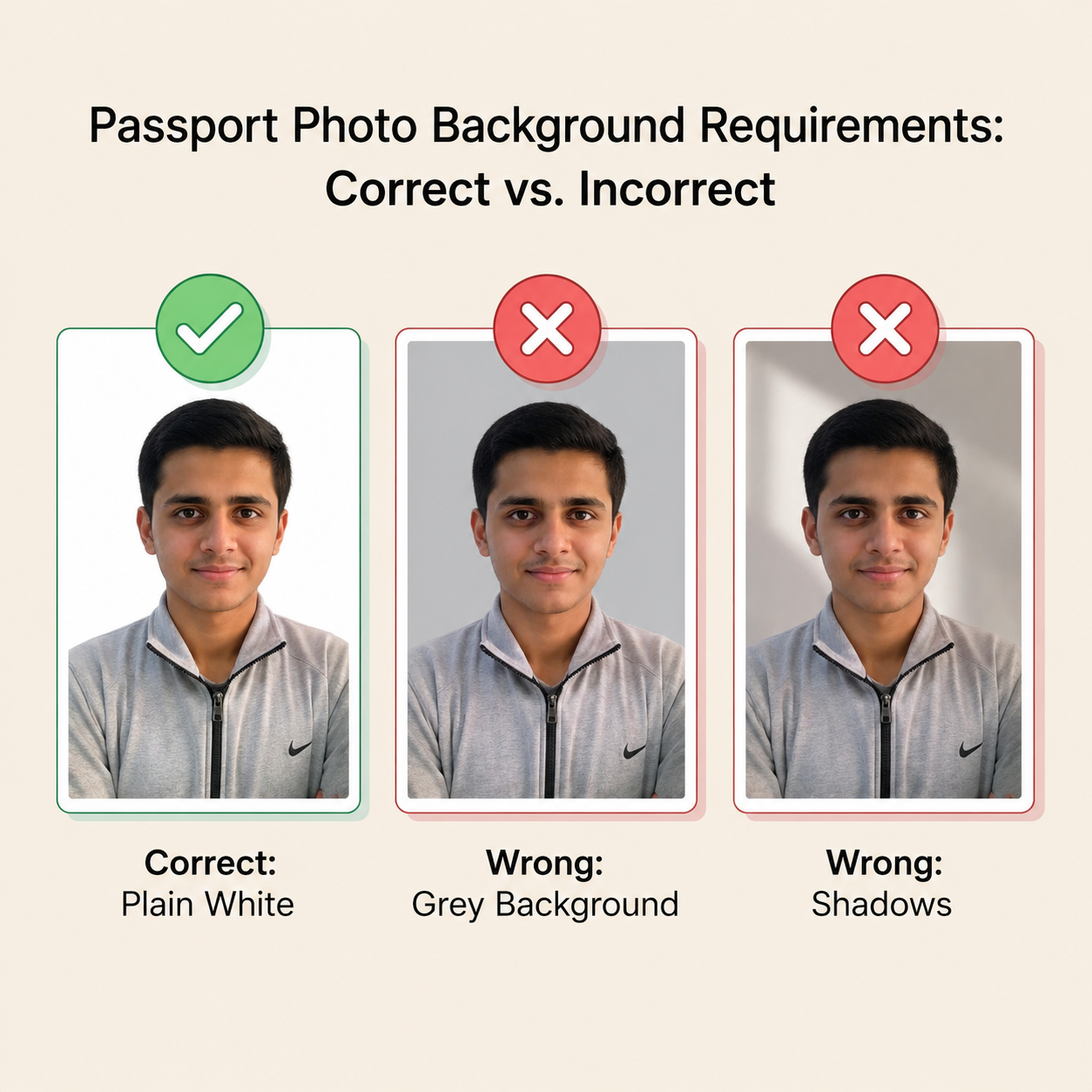
Always stand facing a window with natural light. Avoid harsh shadows on your face or the background. Even lighting reduces the load on AI background removers and prevents artifacts from appearing around your hair or shoulders.
Biometric scanners are calibrated to specific facial measurements. The 2x2 inch format ensures the head size remains between 1-1 3/8 inches. Deviating from this causes misalignment in their automated processing systems, leading to application delays.
Modern rules for most government entities (including many Indian state exams) strongly discourage wearing glasses to prevent glare reflections. Even if you wear them daily, it is best to remove them to ensure your eyes are clearly visible to the biometric software.
Our tool utilizes an advanced AI segmentation model to isolate your silhouette and replace the background with a clean, standard white color. This ensures that you meet the "plain white or off-white" requirement strictly requested by international visa authorities.
Yes, for printing purposes, a PDF sheet is superior. A single image file might be printed at the wrong size unless you manually resize it. A PDF sheet organizes your photos at the exact dimensions required, preventing scaling errors at local print shops.
While you can, it is not recommended. Our tool includes an AI sharpening feature, but it cannot invent data that isn't there. If your source image is heavily pixelated, the output will suffer. Always capture images in the highest quality available on your device.
Exam portals often have limits like 20KB or 50KB. Our "Signature & Photo Resizer" tool allows you to compress your images while maintaining the necessary clarity, ensuring you meet the upload criteria without needing to sacrifice print quality.
Biometric recognition relies on neutral expressions. A smile or a frown changes the geometry of your face—specifically the shape of your eyes and mouth. Maintaining a neutral expression ensures the software can correctly identify your key facial features during verification.
Yes, it is highly recommended to wear a contrasting color to the background (usually a dark color if the background is white). This makes the edge detection process much more accurate, resulting in a cleaner final output without jagged pixels.
The general rule is to update your photo if your appearance has changed significantly, such as major weight changes, facial hair growth, or a change in hairstyle that alters your face shape. For official documents, photos should not be older than 6 months.
Privacy is our priority. Our tool processes images locally in your browser using TensorFlow.js whenever possible, meaning your photos are handled directly on your device rather than being uploaded to our servers. We value your privacy and data security.
Use our tool to generate photos for each specific requirement. For example, use the UPSC preset for one and the JEE preset for another. This ensures you always have the correct dimensions ready for each specific application portal.
Blurriness usually results from "upscaling"—stretching a small image to a larger size. Always upload a photo that is larger than or equal to the size you need. If the source image is too small, no tool can magically increase the pixel count without losing some definition.
Exam Requirements & Specifications Reference
Use this guide to ensure your photo matches the specific criteria required by major Indian entrance and recruitment exams. Always check the official notification for the most current year's guidelines.
| Exam | Field | Standard Dim. (cm) | Key Requirement |
|---|---|---|---|
| UPSC CSE | Civil Services | 4.0 x 5.0 | Name & Date Imprinted |
| SSC CHSL/CGL | Govt Jobs | 3.5 x 4.5 | White Background |
| NDA & NA | Defence | 3.5 x 4.5 | Formal Attire |
| JEE Main | Engineering | 3.5 x 4.5 | 80% Face Visibility |
| GATE | Engineering | 3.5 x 4.5 | Neutral Expression |
| BITSAT / VITEEE | Engineering | 3.5 x 4.5 | High Resolution |
| NEET UG | Medical | 4.0 x 6.0 (Postcard) | White Background |
| CUET UG | University | 3.5 x 4.5 | No Accessories |
| CAT / XAT | Management | 3.0 x 4.0 | Professional Look |
| CLAT | Law | 3.5 x 4.5 | Clear Ears Visible |
| NID / UCEED | Design | 3.5 x 4.5 | Natural Lighting |
| CA Foundation | Commerce | 3.5 x 4.5 | White Background |
| IISER IAT | Science | 3.5 x 4.5 | Neutral Background |
| IPMAT | Management | 3.5 x 4.5 | Clean Backdrop |
| NATA | Architecture | 3.5 x 4.5 | Shoulders Straight |
* Note: This table covers the most frequent requests. Always re-verify with the official Information Bulletin provided by the examining body before your final upload.